Plan-and-Execute vs ReAct: practical comparison of AI agents
Day 39 / 60
During the week I wrote about the 4 possible paths to scale D.N beyond 30 tools. After talking with some friends and my agents, I decided to go with: Plan-and-Execute.
And it worked quite well, honestly.
The numbers that matter
The same power flow study that a week ago took 4.6 minutes with 15 tools now looks like this:
60.2
minutes
82
tools
$1.05
USD
2M
tokens
Quality
"Looked like it was written by an intern"
Quality
13 pgs · 10 diagrams · 1 hour autonomous

Yes, it takes more time. Yes, it uses more tools. But the result went from 6 pages to 13 pages with 10 diagrams and 3 different operation scenarios. The report that used to look like it was written by an intern now looks much better.
The agent ran for a full hour without asking me anything. One of my goals is to get D.N to run autonomously for hours with just one instruction. This week I achieved that for the first time.
The agent already writes reports better than I do. And that's the first step of what I wanted to achieve.
How the new architecture works
I added a classifier at the beginning of each query. When an instruction arrives, the system decides: is this a simple task that traditional ReAct can solve, or does it need planning?
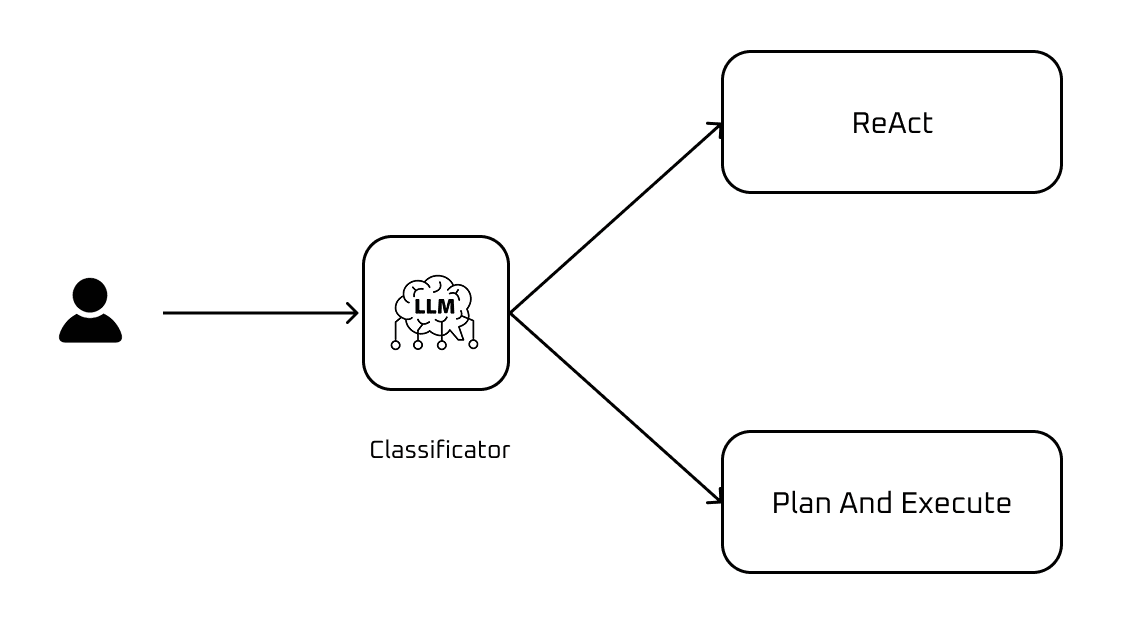
Task classifier
If it's simple — "show me the San Pedro bus diagram" — the agent responds as always. No changes.
If it's complex — "do a complete power flow study with contingencies" — Plan-and-Execute kicks in:
- The Planner (Gemini 3 Pro) generates a structured task plan
- The Executor (Gemini 3 Flash) executes each task one by one
- If something fails, the Planner replans with the error context
In the test I ran, the classifier detected it was a complex task with high confidence and activated Plan-Execute. The Planner generated an initial plan of 15 tasks:
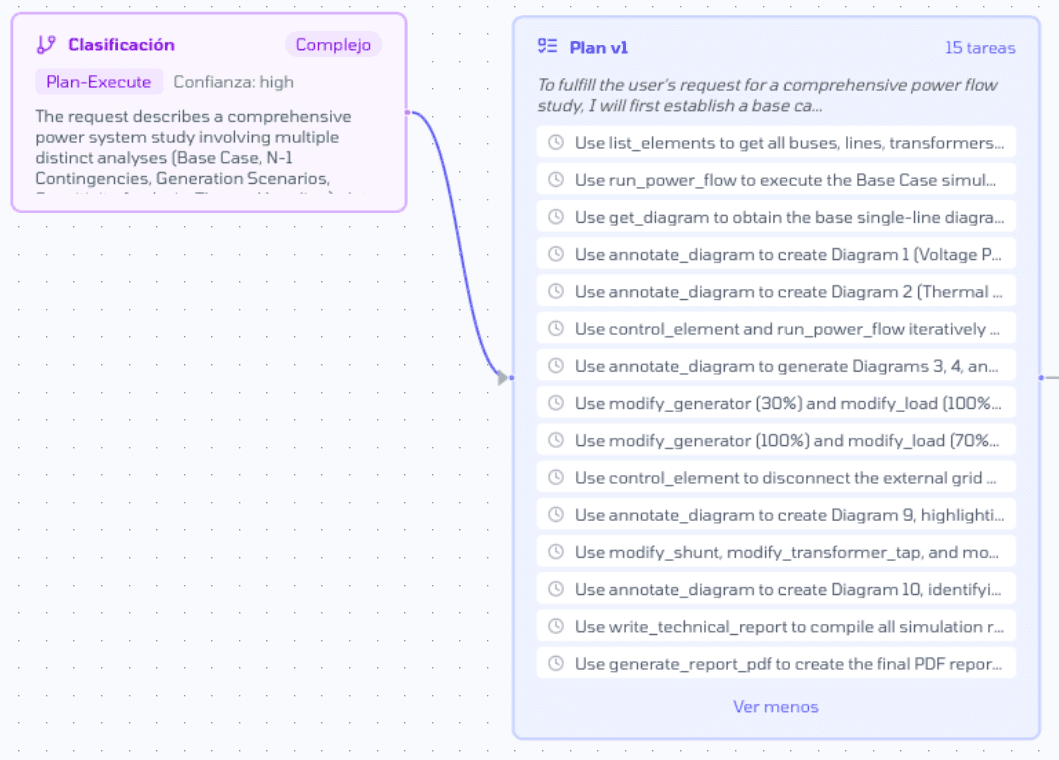
Plan v1 generated by the agent
What surprises me is the level of detail. The agent decided on its own to use annotate_diagram to create technical visualizations — a tool that lets it write on PowerFactory's single-line diagram.
_diagram_1769715723152_annotated_1769717116857.png&w=3840&q=75)
Single-line diagram annotated by the agent
The prompt I gave was extensive and specific. I asked for a complete study with base case, thermal loading analysis, N-1 contingencies, three generation scenarios (minimum at 30%, maximum at 100%, island operation), loss analysis, voltage profile, sensitivity analysis, and 10 diagrams with specific color codes for voltages and overloads.
And the agent interpreted it correctly:
- Use
list_elementsto get all buses, lines, and transformers - Create specific diagrams: Diagram 1 (Voltage Profile), Diagram 2 (Thermal Loading)
- Use
control_elementandrun_power_flowiteratively for contingencies - Modify generators to 30% and 100%, loads to 70% and 100% for different scenarios
- Disconnect the external grid to simulate island operation
- The last two tasks:
write_technical_reportandgenerate_report_pdf
The agent understood the domain. It knows that a power flow study needs base cases, N-1 contingencies, generation scenarios, and that everything ends in a report. It planned the 10 diagrams I asked for. All good.
Task 9 failed (I think it was because Gemini 3 was overloaded at that moment). Instead of getting stuck, the Planner redid the plan considering the error and continued.
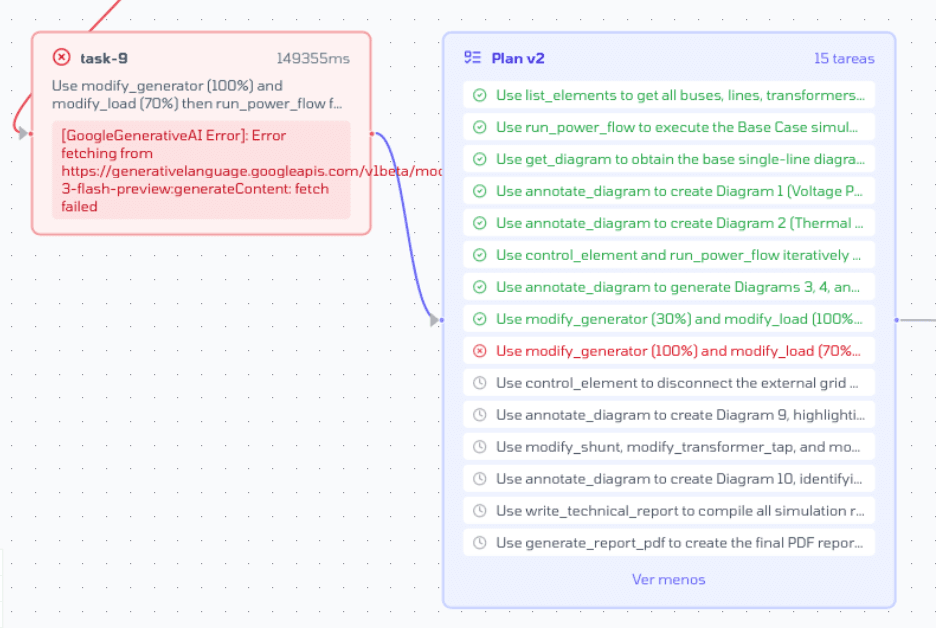
Plan v2 generated by the agent
This is exactly the "Senior-Junior" model I described in my previous post. The senior thinks. The junior executes fast and cheap.
Problems I need to solve
Parallelization. All tasks run sequentially. One after another. But many could run in parallel — generating diagram 1 doesn't depend on generating diagram 2.
The solution is to have the Planner generate a DAG (Directed Acyclic Graph) instead of a linear list. Each task declares its dependencies, and the Executor can run in parallel everything that has no conflicts.
This is a priority. If I can parallelize, I could bring the time down from 60 minutes to 20-30.
Small systems. Everything I'm testing is with systems of 50 buses max — that's the limit of my DIgSILENT license. The real Chilean power system has over 2,500 buses. I don't know how the agent will behave when it scales.
Missing tools. I'm missing the Infotécnica and PGP tools. Without them, the agent can't access official data from the Coordinator. They're in the backlog.
What's next
Using other agents in my day to day I noticed something: the best ones don't start executing right away. They ask first. They clarify. They make sure they understand what you want before getting to work.
D.N doesn't do that. You tell it "do a power flow study" and it takes off running. Sometimes that's fine, but other times the result isn't what you expected because it assumed things it could have asked about.
The next step is to add a clarification phase before execution. Have the agent ask: what scenarios do you want? What level of detail? Is there a specific contingency you care about? And only after understanding everything, build the plan and execute.