Automating short-circuit and protection studies with AI
Day 36 / 60
For those not up to speed, a reminder of the 4 goals I'm pursuing with this project:
- Undergraduate thesis — I never got my engineering degree, and I want to obtain it with this project
- Gemini 3 Hackathon — 25 thousand registered, 2 weeks left to submit
- Real product — I want this to become a tool I can commercialize
- Building in public — Document the process, receive feedback, create community
The hackathon is the closest deadline and the one generating the most pressure.
The agent now generates three types of electrical studies: power flows, short-circuits, and protection coordination.
On Saturday it could only run power flows. Today the agent simulates three-phase faults, calculates short-circuit currents, and generates ECAP reports with relay settings. The three fundamental pillars of a grid connection study. The reports are still mediocre, but it's still progress.
But with this progress I ran into a big problem.
As Project D.N grows, the agent becomes more complex. To support the three types of studies, I reached 30 available tools. And I feel like it started to break.
The cognitive problem
It's not that the model (Gemini 3 Flash and Gemini 3 Pro) is bad. It's that we're forcing a single "brain" to hold too many options at once.
When you give 30 tools to an LLM in a simple ReAct loop, three things happen:
Tool hallucinations. It starts inventing arguments or mixing functions that don't exist.
Attention fatigue. It loses track in long processes, like studies requiring 40+ sequential steps.
Latency. The prompt becomes huge and each decision takes longer than necessary.
I asked my other agent Pedrito to do deep research and discuss what was the best thing we could do. These are the 4 paths I'm exploring.
Four paths
1. Sub-Agents
The classic divide and conquer idea. Instead of one agent with 30 tools, you have several specialized agents with fewer than 10 each.
In my case it would be something like: a Simulator Agent that only knows PowerFactory (run flows, simulate faults, extract results), a Protections Agent that configures relays and calculates settings, and a Reporter Agent that takes data and generates PDFs with tables and charts.
Above all of them lives an orchestrator. The user says "make me an ECAP study", and the orchestrator decides: first I ask the Simulator to run short-circuits, then I pass those results to Protections to calculate settings, and finally the Reporter generates the report.
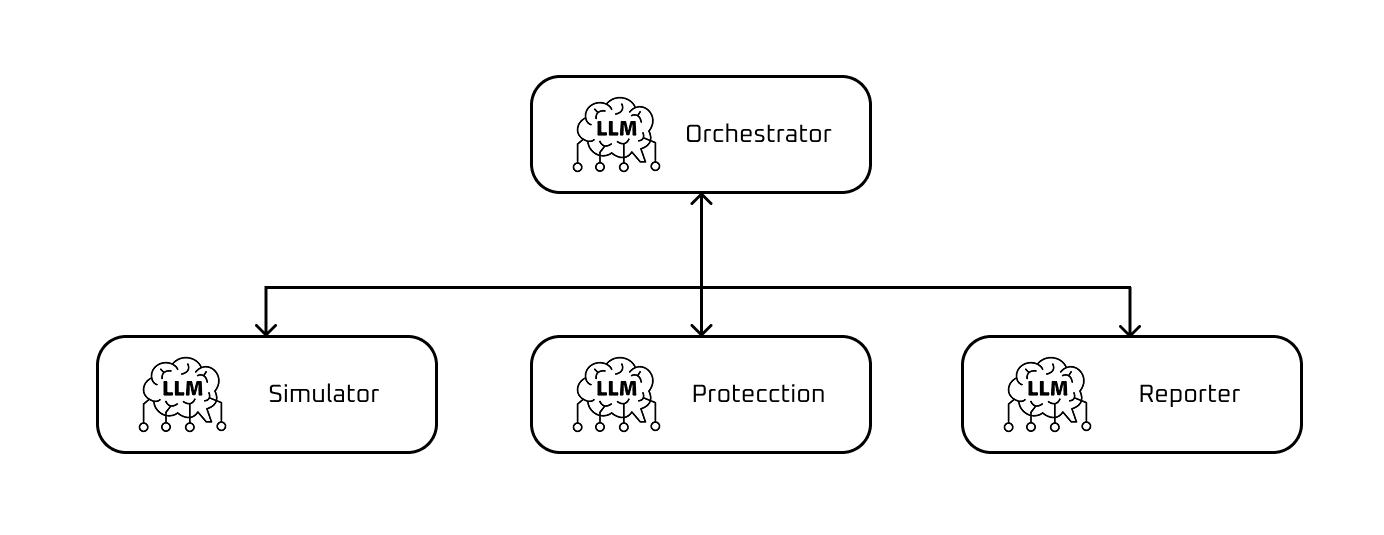
Sub-agents architecture diagram
I like it conceptually because each agent becomes an expert in its domain. The Simulator doesn't need to know anything about PDFs. The Reporter doesn't need to know what an overcurrent relay is.
But the complexity scares me. Suddenly I have 4 agents to coordinate instead of one. What if the orchestrator also gets confused with so many options? What if communication between agents loses critical information?
2. Dynamic Multi-Routing
This keeps a single brain but with tool "folders" that activate based on context.
Imagine the agent has access to an initial router. When an instruction like "simulate a short-circuit" arrives, the router detects it's a simulation task and loads only the 8 related tools: connect to PowerFactory, define fault, execute calculation, extract currents, etc. The other 22 tools don't even exist for that call.
If the user then says "now generate the report", the router switches context and loads the reporting kit: create document, insert table, add image, export PDF.
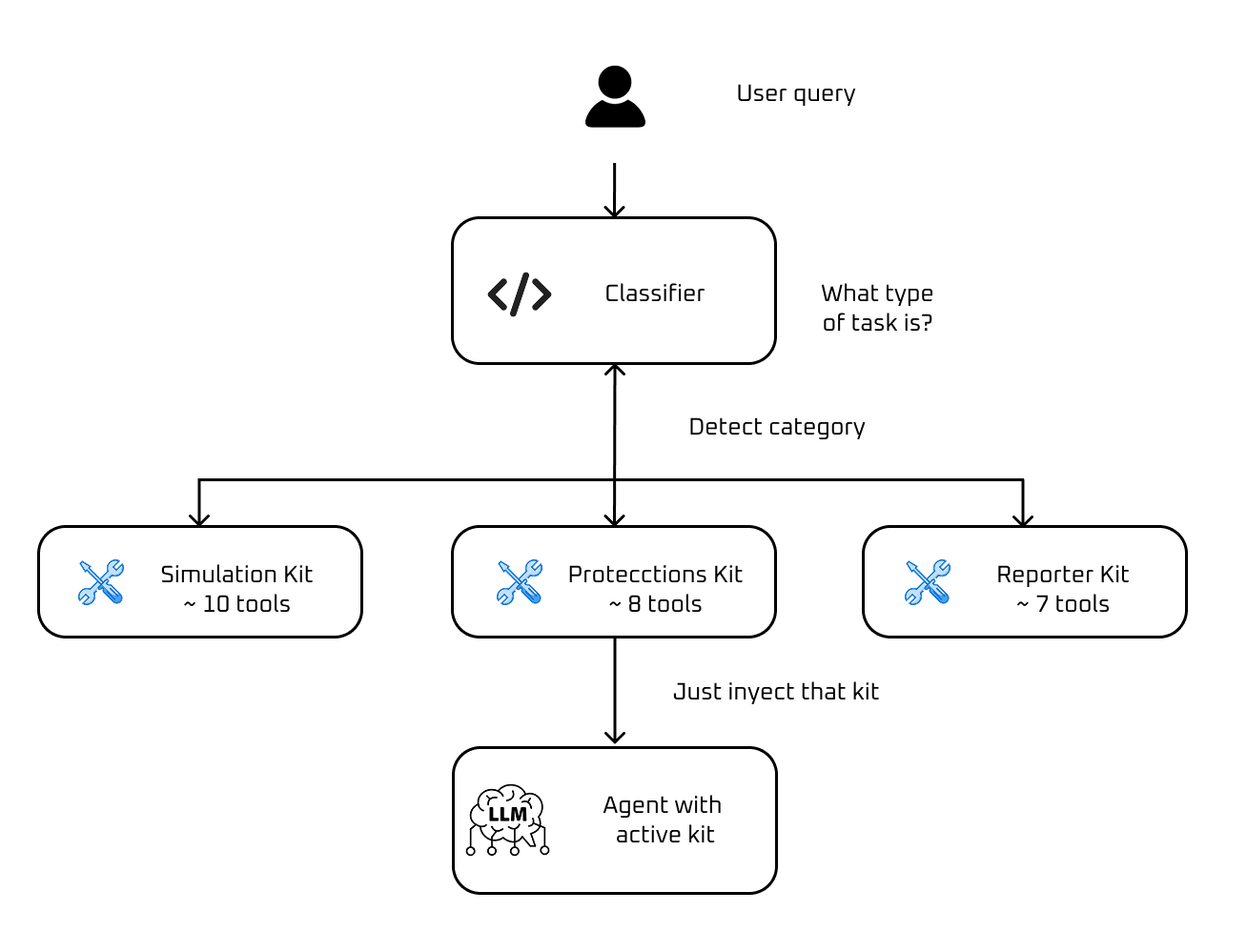
Dynamic multi-routing diagram
It seems elegant in theory. The agent always sees a manageable set of tools (a kit), but has full access through routing.
In practice, who decides which kit to load? I need a classifier before the agent, another model or a rule system that interprets intent. Another piece that can fail, another point where nuances can be lost. "Simulate a short-circuit and then adjust protections" — does that activate one kit or two?
3. Tool RAG (Retrieval Augmented Tools)
This one blew my mind when I discovered it. The idea is to treat tools as if they were documents in a RAG system.
Each tool has a rich description: what it does, when to use it, what parameters it receives, usage examples. All those descriptions are indexed in a vector database, just like you would with text documents.
When a user instruction arrives, the system does a semantic search: "which of my 100 tools are most relevant for this?". It retrieves the top 5 or 10, and only those are passed to the model in the prompt.
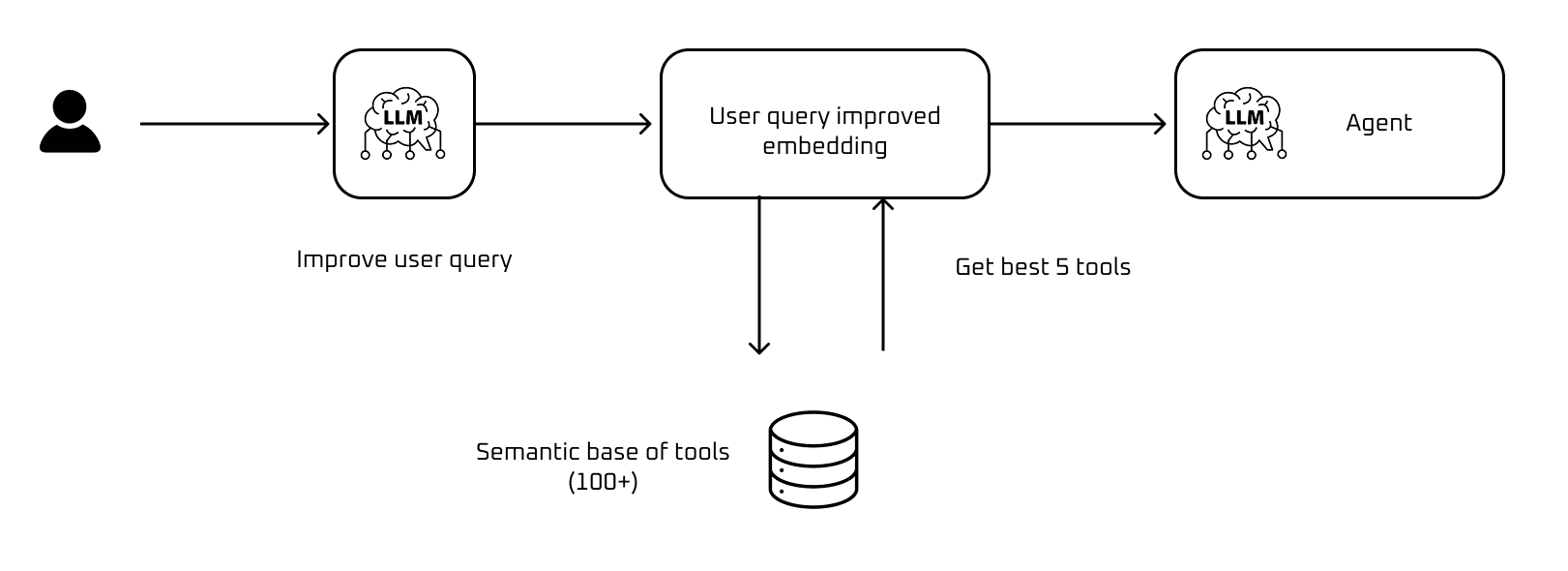
Tool RAG diagram
In theory, this scales the most brutally. I could have 500 tools and the agent always sees a small, relevant set. There's no practical limit. Also, adding a new tool is just adding it to the index — you don't have to reorganize architectures or retrain anything.
But it requires describing each tool with surgical precision. If the description of simulate_three_phase_fault doesn't mention "three-phase short-circuit", retrieval won't find it when the user asks for that. System quality depends on description quality, and that's intense manual work (or Pedrito could do it).
4. Plan-and-Execute (The Senior-Junior model)
This is the one that convinces me most for the hackathon.
The architecture separates planning from execution into two distinct agents. A Planner receives the complete user instruction and generates a plan: an ordered list of steps to execute. An Executor takes that plan and executes each step one by one, with full access to all tools.
The Planner is the "senior" on the team. It doesn't need to know the exact arguments of each function or what they're called internally. It just needs to understand the domain and think strategically: "to do an ECAP study, first I need system data, then I simulate short-circuits at each bus, then I calculate protection settings, and finally I generate the report".
The Executor is the "junior". It receives atomic instructions like "simulate a three-phase short-circuit at San Pedro 220kV bus" and translates them to specific tool calls. It doesn't need to understand the big picture, just execute each step well.

Plan-and-Execute diagram
Why does this convince me? Because it separates cognitive load naturally. The Planner sees few abstract tools ("simulate fault", "calculate protections", "generate report") while the Executor sees all 30 concrete tools but only needs to choose one at a time for a specific step.
Also, I can use Gemini 3 Pro for planning and Gemini 3 Flash for execution. The expensive brain thinks little but well. The cheap brain works a lot but simply. I optimize cost and quality at the same time.
According to Pedrito's research, this is the architecture with the most traction.
The bug that's killing me
There's a serious error I can't solve. Some prompts are killing D.N.
Gemini 3 doesn't respond. I get a status 500 that shouldn't happen.
The most frustrating thing is the inconsistency: sometimes I think I made some change wrong in my code, and other times I think Gemini 3 is the problem. Pedro is also giving me problems, and Pedro uses Gemini 3.
My hypothesis: 30 is the practical limit for tools. Beyond that, the system becomes unstable. Reports are especially problematic — they almost always die at that step.
The agent went from feeling very stable to feeling fragile.
The next 36 hours
With 2 weeks until the Google hackathon, I have to make an architecture decision. And I can't mess it up.
These are the moments I enjoy most. I love making technical decisions. If I choose wrong, I lose days implementing something I'll have to redo. If I choose right, the agent scales and I arrive at the hackathon with something solid.
Plan-and-Execute convinces me conceptually, and after researching, it seems to be the pattern with the most traction in production — LangGraph and Google's ADK document it as a reference architecture.
My tools aren't generic. They're PowerFactory calls, specific relay configurations, single-line diagram generation. Will the Planner understand the electrical domain well enough to generate good plans? Or will I end up with a senior who doesn't know electrical engineering giving instructions to a junior who does?
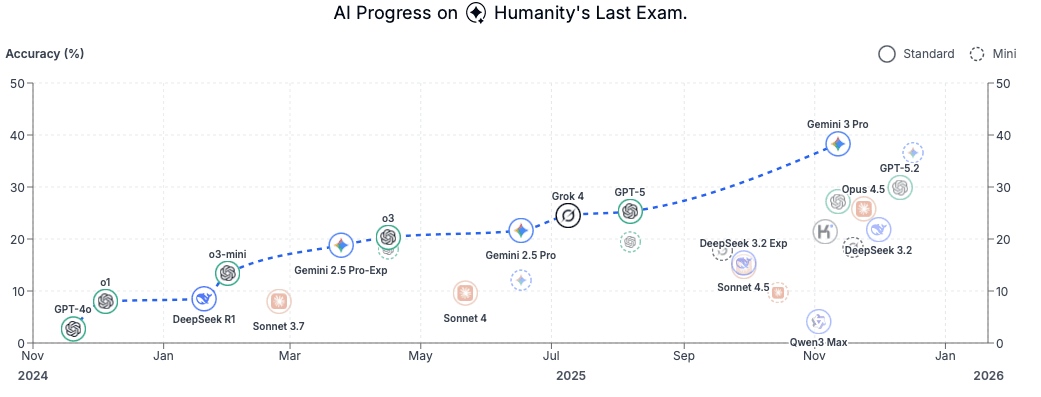
Gemini 3 Last Exam
According to the Google DeepMind team, Gemini 3 has the best performance on Humanity Last Exam, so the planner should work well.
I'm going to take 36 hours to decide. Prototype something minimal of each approach, see which feels more natural with my current tools, and then commit fully.